How I moved from a /24 to a /18 network with minimal downtime
March 16, 2026 by J. Wubben
When I originally built this environment, I used a /24 network. Why? Because it's dead simple. But that was over 3 years ago. Now, I run more virtual machines and have more hypervisor nodes. As a result, I was getting dangerously close to running out of IPs on the local network.
For those who do not know, a /24 network allows for about 254 IPs, while a /18 network allows for about 16,382 IPs. So, moving to a /18 network would allow me to have significant growth, as illustrated by the image below using ipcalc.
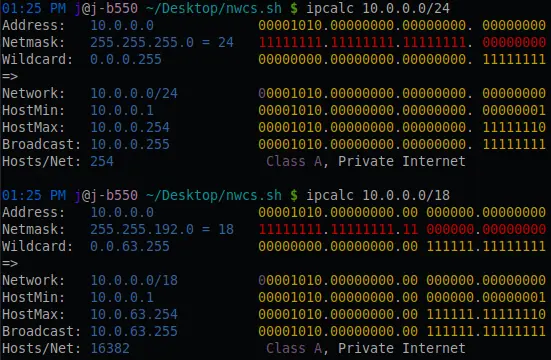
Can I just move all the hypervisor nodes to the /18 network? No, because my private cloud platform is tied to the underlying network through IPAM. My main concern with this migration was that I had never actually performed a subnet change in my private cloud platform before. This meant that I needed to do some investigating, and create a runbook to perform the migration successfully.
The Runbook
- Backup the database (I use PostgreSQL): sudo -u postgres pg_dump --create db > backup.sql
- For each hypervisor, change the network from a /24 to a /18 (I use Ubuntu Server LTS).
- Change the Netplan configuration from /24 to /18: vim /etc/netplan/50-cloud-init.yaml
- Apply the configuration: sudo netplan apply
- Shutdown all virtual machines and reboot the hypervisor nodes: curl -s localhost:8080/api/v1/sys/kill/all && sudo reboot
- Change platform references and other references from /24 to /18. This was the highest risk change because my IPAM code was a few years old at this point. So, I had to check through my references to make sure the CIDR wasn't being referenced elsewhere.
- Update the IPAM, run this SQL: UPDATE ipam SET cidr = 'x.x.x.x/18' WHERE metadata_id = 'ipam-1234';
- Change firewall address from a /24 to a /18. I use OPNsense, so this change was easy enough to update through the UI.
- Perform one final reboot to test to confirm everything comes online as expected.
- Check services to verify all are working as expected.
- NWCS online?
- Fanciful Realities online?
- Am I receiving prometheus remote write metrics?
What went wrong?
While I was performing the database update, I ran into an error with PostgreSQL: ERROR: column "ipam" does not exist LINE 1: ...pam set cidr = "10.x.x.x/18" where metadata_id = "ipam-xxx"

In case you were unaware, PostgreSQL does not like the use of double quotes for string types. Thankfully, resolving this was relatively simple; all I had to do was switch them to single quotes. However, this did result in a few additional seconds of downtime.
Total downtime?
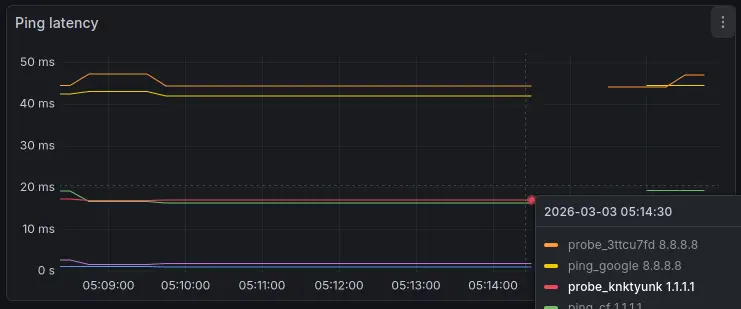
I have a synthetics monitoring service that I use to measure latency and the status of endpoints. Below, you can see that the total downtime was under a minute: from 5:14am to 5:15am UTC.
Summary
Despite having never attempted it before in my private cloud, the migration went rather smoothly. The main time sink was investigating other resources that may have needed updating. I found that the only database update required was in the IPAM table, which was a relatively simple fix. In short, the migration from a /24 to a /18 network was a great success.

Now, a new problem presents itself; how do I keep 16,382 IPs organized?
If you have questions about this blog post, or would like to suggest a topic for a future blog post, please feel free to reach out.